
About Jigsaw Puzzle Game
Jigsaw Puzzle Game reimagines the classic pastime for the digital age. Forget about lost pieces under the couch or running out of table space—this browser-based experience offers infinite replayability with a vast library of high-quality images and powerful customization tools. Whether you’re a casual player looking for a quick 36-piece break or a hardcore puzzler ready to tackle a 1,000-piece challenge with rotating tiles, Jigsaw Puzzle Game adapts to your style.
Built with modern HTML5 technology, this game runs smoothly on desktops, tablets, and smartphones without any downloads. It features intelligent mechanics like “Smart Snap” technology, auto-saving, and a unique “Slot Machine” mode that randomizes your game settings for a fresh challenge every time.
Why Play This Version?
Most online jigsaw games are static and boring. We’ve added layers of interactivity to keep things exciting:
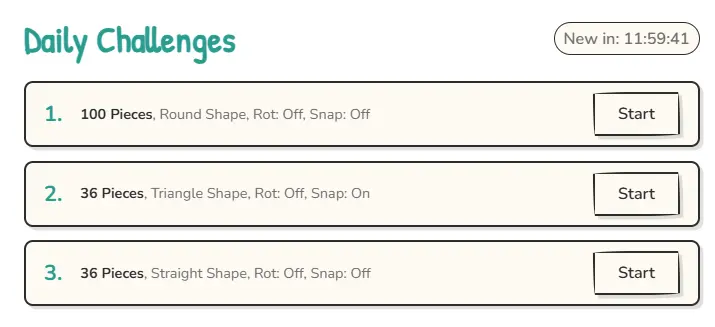
Daily Challenges: Every 24 hours, the game generates three unique puzzles (Easy, Medium, and Hard). Can you beat the clock and complete the daily streak to earn your “Completed” badge?
Custom Puzzles: Have a favorite photo of your pet, a vacation spot, or a family memory? Use the “Upload Your Own” feature to instantly turn any image from your device into a playable puzzle.
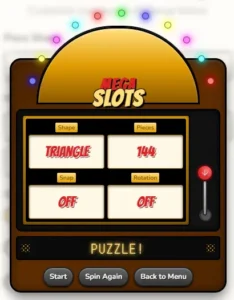
Slot Machine Mode: Feeling indecisive? Pull the lever on the built-in “Mega Slots” minigame. It spins to randomly select your piece count, shape, and difficulty settings—perfect for players who want a surprise.
Save & Resume: Life happens. If you need to leave, just close the tab. Your progress is automatically saved to your browser, so you can pick up exactly where you left off later.
Deep Customization Options
You aren’t stuck with just one type of puzzle. Before you start, you can tweak every aspect of the game:
4 Unique Piece Shapes:
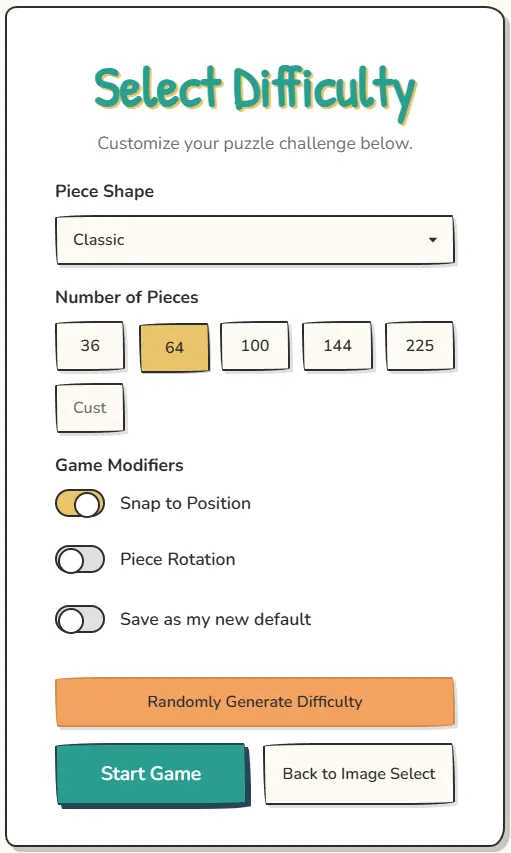
Classic: The standard jigsaw shape we all know and love.
Triangle: Sharp, angular pieces that test your spatial awareness.
Round: Curved, bulbous pieces that fit together in unexpected ways.
Straight: A grid-like cut that relies entirely on image matching rather than shape fitting.
Difficulty Levels: Select from preset sizes like 36, 64, 144, or 225 pieces. Feeling brave? Type in a custom number up to 1000 pieces for an expert-level marathon.
Game Modifiers:
Rotation: Enable this to make pieces spawn at random angles. You’ll need to rotate them to fit, adding a significant layer of difficulty.
Snap to Grid: When enabled, pieces automatically “magnetize” to their correct spot when you drop them nearby. Turn this off for a pure, unassisted challenge.
Game Icons & Symbols Guide
The interface uses intuitive icons to help you manage your board. Here is exactly what each symbol does:
Navigation & System
🏠 Main Menu: Saves your current progress and returns you to the image selection screen.
🔄 Restart: Wipes the current board clean and re-scrambles the pieces for a fresh start.
⚙️ Difficulty: Takes you back to the settings screen to change piece count or shape without changing the image.
⏸️ Pause: Stops the timer and freezes the game. Perfect for when you need a break.
🔊 Sound: Toggles the sound effects (clicks, snaps, and victory fanfare) on or off.
⛶ Fullscreen: Expands the game to fill your entire screen for an immersive experience.
Gameplay Tools
🖼️ Full Image: Hover or click this to peek at the completed photo. Use it as a reference when you get stuck.
👻 Ghost Mode: Toggles a faint, semi-transparent version of the image behind the puzzle board. This acts as a guide for where pieces should go.
🧲 Snap: Toggles the “magnetic” effect. When on, pieces lock into place easily. When off, you must place them with precision.
⏹️ Edges: Instantly filters out all middle pieces, leaving only the edge (border) pieces visible. This is the best way to start any puzzle!
♻️ Rotate: Enables or disables piece rotation. If on, click or tap a piece to rotate it 90 degrees.
View Controls
Zoom (+ / -): Zoom in to see fine details or zoom out to see the whole board.
Pan (Arrows): Move the camera around the board to focus on specific sections.
Target Icon: Instantly resets the view to center the puzzle and fit it to your screen.
How to Play
Select an Image: Choose a high-quality photo from our gallery, upload your own, or pick a Daily Challenge.
Configure: Set your piece count and shape. Use the “Randomize” slot machine if you’re feeling lucky.
Solve: Drag and drop pieces to move them. If Edge Mode is available, build the frame first!
Connect: When two pieces belong together, they will snap into a group. You can then move the entire group as one unit.
Win: Complete the image to stop the timer, see your stats, and share your victory with friends!
Jigsaw Puzzle Game Images
nice
Incredible work great functionality of the site and very responsive..